

The holidays are a prime time for reading, and the right apps can make a noticeable difference in convenience, discovery and comfort. This guide evaluates widely used Kindle-related apps and companion tools so that the reader can choose software suited to their device, reading habits and budget. It explains why each option matters, how it benefits everyday reading — from seamless syncing across devices to discovering free holiday reads — and which app is best for specific needs.
The coverage is device-agnostic and focused on delivering practical recommendations for readers who want the best kindle experience across phones, tablets and desktops.
Top Picks
| Category | Product | Price | Score |
|---|---|---|---|
| 🏆 Best Mobile Reader | Free | 84/100 | |
| 💰 Best For Budget Readers | Free | 78/100 | |
| 🎯 Best Discovery Tool | Free | 80/100 | |
| 🚀 Best Quick Setup Guide | $2.99 | 68/100 | |
| 💼 Best Desktop Experience | $0.99 | 68/100 | |
| ⚠️ Most Limited App | Free | 46/100 |
How Apps Were Selected
The apps were evaluated on relevance to the kindle ecosystem, device compatibility, reading experience features (syncing, typography, orientation controls), discovery and value (free content and bargains), reliability (stability and user-reported performance), and practicality for holiday usage (offline access, quick setup). The selection favors apps and guides that help the reader access, organize and enjoy kindle-format content across phones, tablets and desktops.
🏆 Best Mobile Reader
Kindle for Android
It brings a full Kindle library to a phone in a way that’s easy to live with every day. The app syncs reading position, notes and highlights through Whispersync, so they can switch between devices without losing their place.
For daily commutes it’s a quick way to steal a few chapters, and for holiday travel it becomes a pocket library that stores books for offline reading. The Kindle experience on Android also offers adjustable text, themes like sepia or dark, and in-app shopping for fast purchases—practical for someone who reads casually or wants a ready-to-go library for a weekend getaway.
They’ll find it a solid, low-friction companion to a dedicated Kindle device or a handy replacement when travelling light.
What People Say
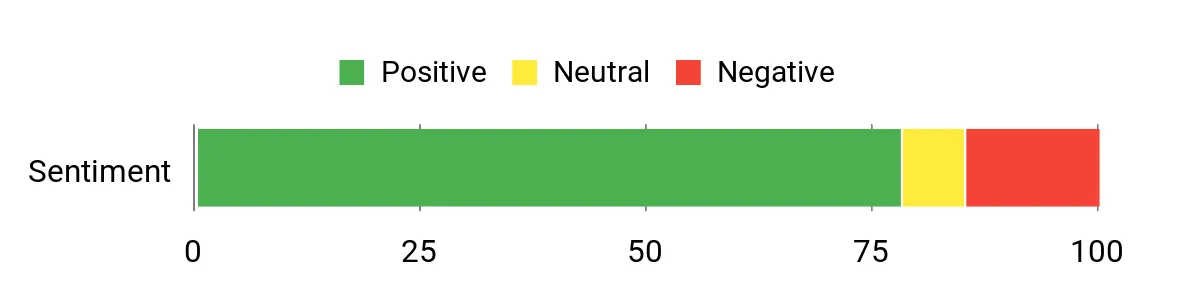
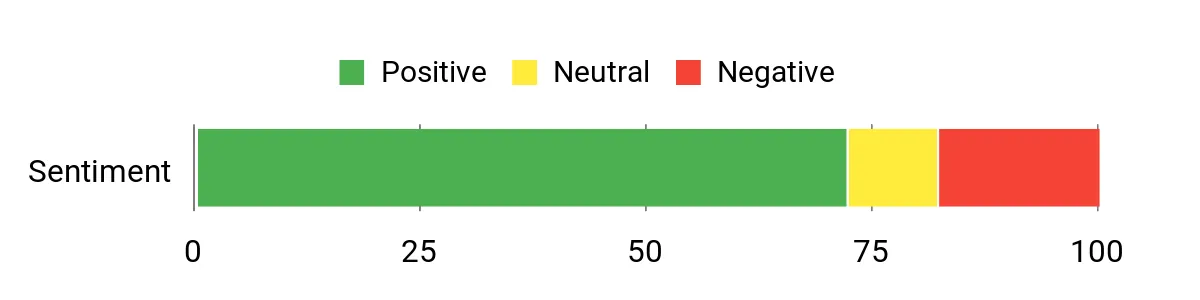
Customers often praise how reliably the app syncs reading progress across devices and how easy it is to buy and download books from the Kindle Store. Many highlight the reading customization options—text size, themes and orientation—while a few mention battery usage or occasional stability quirks on older phones.
Overall Sentiment: Positive
Long-Term Savings
Because the app itself is free, users save upfront costs; buying digital editions, using library loans or subscribing to services like Kindle Unlimited can lower per-book expenses over time. For someone who reads a lot, digital purchases and subscriptions typically cost less than buying the same number of new print books.
Return on Investment
The app’s ROI is mostly time and convenience: it turns a phone into an always-available library, which can increase reading frequency without extra hardware spending. For frequent readers the convenience and lower per-title cost can quickly pay back any money spent on digital books or subscriptions.
Best For
| Situation | How It Helps |
|---|---|
| Commuting | They can read offline downloaded books between stops, using short pockets of time productively. |
| Holiday travel | It stores a variety of titles without extra luggage, and downloaded books are available without internet. |
| Cross-device reading | Whispersync keeps their place, highlights and notes synced when switching between phone, tablet or Kindle. |
| Trying new genres | Quick in-app purchases and samples make it easy to sample new authors or ebooks without a big commitment. |
Learning Perks
It supports learning by letting readers highlight passages, add notes, look up words with an integrated dictionary and export highlights for later review. Search inside books and X-Ray (where available) help them explore context and references.
Ease Of Use
| Feature | Ease Level |
|---|---|
| Installation & setup | Easy |
| Finding and buying books | Easy |
| Syncing between devices | Easy |
| Adjusting reading settings | Moderate |
Versatility
The app works for casual reading, long-form novels and PDFs; it supports multiple themes and display options and is useful both as a companion to a Kindle or as a standalone reader on phones and tablets.
Travel Friendliness
Highly travel-friendly: books can be downloaded for offline reading and the app keeps a compact, searchable library on the device. Users should be mindful of battery life when reading extensively on a phone.
Usability
| Aspect | Ease Level | Notes |
|---|---|---|
| Navigation | Easy | Simple swipe or tap controls and a clear table of contents. |
| Reading customization | Moderate | Many options—font, size, margins and themes—may take a moment to fine-tune. |
| Account & library management | Easy | Library sync and store integration keep account management straightforward. |
| PDF handling | Moderate | PDFs open well but complex layouts can be slower on older devices. |
Why Readers Like It
- Access to a massive Kindle library on a phone
- Whispersync keeps place, notes and highlights in sync
- Customizable reading settings (text size, themes, orientation)
- In-app store for quick purchases and downloads
Current Price: Free
Rating: 4.2 (total: 30093+)
⚠️ Most Limited App
Free Apps for Kindle Fire
This offering feels more like a lightweight Amazon portal for Fire tablets than a full app ecosystem. It lets them browse a handful of free offerings and make purchases, but many users find it lacks the range and functionality they’d expect from a modern app store.
For everyday use it can handle quick shopping or basic downloads on a Kindle Fire, and during the holidays it’s handy for last-minute purchases straight from the tablet. That said, if they want a true reading or app discovery experience, this is more of a stopgap than a go-to choice.
What People Say
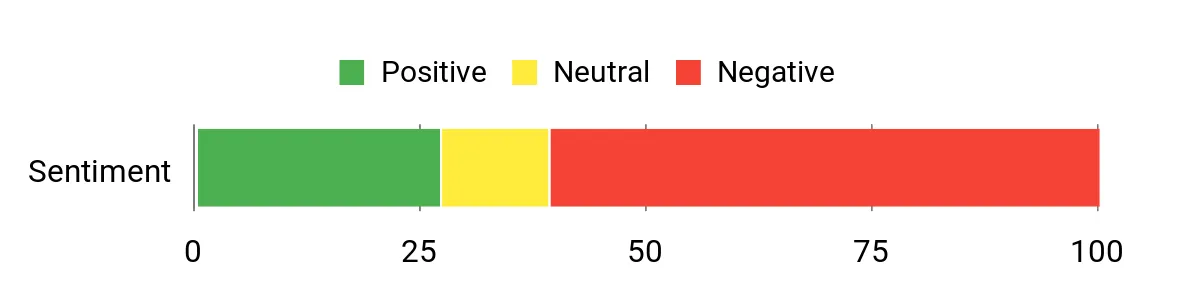
Customers commonly report frustration with the app’s limited functionality and restricted app availability on Fire devices. Many note it mainly serves as an Amazon shopping portal rather than a robust app store, while a smaller group says it’s easy to use for simple purchases or basic downloads.
Overall Sentiment: Negative
Long-Term Savings
Being free removes any upfront cost, so there’s no financial barrier to trying it. Over time, however, savings are minimal because it doesn’t unlock deeper value like reading subscriptions or broader app ecosystems that might lower per-use costs.
Return on Investment
The practical ROI is low: they won’t gain much beyond convenient access to a few free apps and Amazon purchases. For someone who only needs occasional shopping from a Fire tablet it’s fine, but heavy app users or readers will see limited payoff.
Best For
| Situation | How It Helps |
|---|---|
| Quick shopping on a Fire tablet | They can make last-minute purchases directly on the device without switching to another app or browser. |
| Basic app downloads | It provides an easy route to grab simple, free apps already approved for the Fire ecosystem. |
| Gift-device setup | When setting up a Kindle Fire as a present, it offers straightforward access to Amazon content and a few starter apps. |
| Low-storage devices | Because it’s lightweight, it won’t take much space and won’t burden older Fire tablets. |
Learning Perks
Minimal. It doesn’t include reading or study tools; the closest value is access to Amazon-published content and simple apps that might offer basic informational use.
Ease Of Use
| Feature | Ease Level |
|---|---|
| Installation & setup | Easy |
| Finding available apps | Moderate |
| Making purchases | Easy |
| Managing downloads | Moderate |
Versatility
Low. It’s focused on basic Amazon content and a small slate of free apps; it doesn’t serve as a flexible reader or a broad app-discovery tool for Kindle users.
Travel Friendliness
Moderately travel-friendly for quick shopping and keeping a couple of small apps on a tablet, but not useful as an offline reading hub or as a replacement for fuller Kindle reading apps.
Usability
| Aspect | Ease Level | Notes |
|---|---|---|
| Navigation | Easy | Simple menus and direct links make basic tasks straightforward. |
| App availability | Difficult | Many users encounter blocked or missing apps that they expect on other platforms. |
| Integration with Kindle | Moderate | Works with basic Amazon content but lacks advanced reading features or deep store integration. |
| Updates & maintenance | Moderate | Updates are handled through Amazon, but feature refreshes are infrequent. |
Why People Choose It
- Free to install and use
- Simple way to shop and download Amazon-offered apps on Fire tablets
- Lightweight, low-storage footprint
- Straightforward interface for basic tasks
Current Price: Free
Rating: 2.3 (total: 24+)
⚠️ Most Limited App
My kindle Library
It’s a stripped-down app that tries to give users a simple way to view and organize kindle titles on a device. They’ll find basic listing and quick-access features that work for everyday tidying—putting a few books in order before a trip or finding a title for a holiday read. For special occasions like gifting a tablet, it can help them sort visible content quickly, but it won’t replace a full-featured Kindle app. They should consider it if they want a no-frills organizer and don’t need syncing depth or advanced reading tools.
What People Say
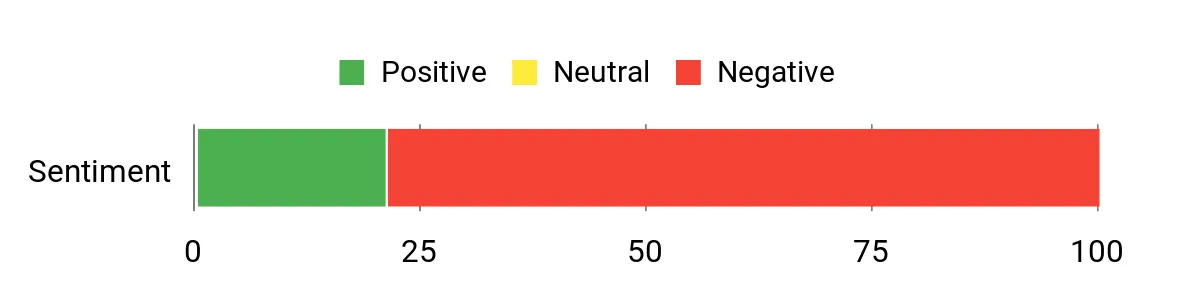
Users often appreciate how lightweight and straightforward the app is for quick library overviews and basic sorting. At the same time, many report frustration with unreliable syncing, missing features for true Kindle integration, and occasional stability issues that limit longer-term usefulness.
Overall Sentiment: Negative
Long-Term Savings
Because it’s free, there’s no upfront expense to try it. Over time, however, the lack of advanced features and inconsistent reliability means it rarely adds ongoing savings compared with using the official Kindle apps or more capable library managers.
Return on Investment
The practical ROI is low: they get quick, no-cost convenience for basic tasks but little lasting value for serious readers who rely on syncing, annotations, or richer reading features.
Best For
| Situation | How It Helps |
|---|---|
| Quick device tidy-up | They can quickly scan and hide or reorder visible titles before lending or gifting a device. |
| Last-minute holiday reading | It makes finding a single title fast when they want something light for holiday downtime. |
| Low-storage devices | Because it’s small, it won’t take much space on older tablets used for casual reading. |
| Basic library preview | It provides a simple list view for someone who wants an at-a-glance overview without extra features. |
Learning Perks
Minimal. It doesn’t offer study tools, note-taking, or annotation syncing; any learning value is limited to basic access to titles rather than active reading support.
Ease Of Use
| Feature | Ease Level |
|---|---|
| Installation & setup | Easy |
| Finding titles | Moderate |
| Syncing with Kindle accounts | Difficult |
| Basic sorting | Easy |
Versatility
Low. It’s focused on basic listing and light organization rather than reading features, discovery, or deep integration with other Kindle services.
Travel Friendliness
Moderately travel-friendly for quick checks and light organization on the go, but not ideal as a primary offline reading or syncing solution.
Usability
| Aspect | Ease Level | Notes |
|---|---|---|
| Navigation | Easy | Menus are simple and straightforward for basic browsing. |
| Integration with Kindle | Difficult | Users report weak syncing and limited access to Kindle account features. |
| Stability | Difficult | Some reviews mention crashes or inconsistent behavior during normal use. |
| Customization | Moderate | Basic sorting options exist but there are few advanced display or organizational tools. |
Why People Choose It
- Free to download and try
- Simple interface for quick library checks
- Lightweight and low on storage
- Fast basic sorting and viewing of titles
Current Price: Free
Rating: 1.8 (total: 7+)
🚀 Best Quick Setup Guide

Install Guide
It’s a concise, practical guide that walks readers through installing the kindle app on iOS, Android, Mac and PC. They’ll find step-by-step directions aimed at beginners, with simple screenshots and quick tips to get reading fast.
For everyday use it helps someone set up their device in minutes; for special occasions like prepping a tablet as a gift or getting a travel device ready for holiday reading, it’s a handy reference. They’ll like it if they want a short, focused walkthrough rather than a deep troubleshooting manual.
What People Say
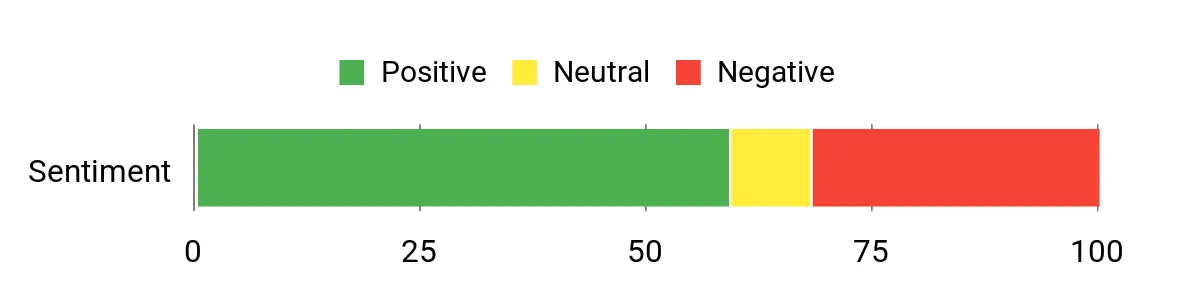
Readers commonly appreciate the short, focused instructions that make installing the Kindle app approachable for less technical users. At the same time, many point out inconsistencies with links or screenshots and note that platform-specific details—especially for PC—can be missing or out of date. Overall, people find it useful for a quick setup but expect to look elsewhere for deeper troubleshooting.
Overall Sentiment: Mixed
Long-Term Savings
At $2.99, it’s an inexpensive one-time purchase that can save a little time setting up multiple devices. Over the long term, however, the guide’s value is mostly immediate — it won’t replace official support or ongoing how-tos when app interfaces change.
Return on Investment
The ROI is solid for someone who needs quick, guided setup: a small payment buys minutes saved and avoids a few setup headaches. For power users who expect comprehensive, platform-specific guidance, the long-term return is limited.
Best For
| Situation | How It Helps |
|---|---|
| Setting up a new tablet for travel | They can follow a short checklist to install Kindle and be ready to read on the plane or during holiday downtime. |
| Helping a beginner | Clear steps make it easier for someone who isn’t tech-savvy to get the app installed without frustration. |
| Quick refresh before gifting | It provides the basics needed to prepare a device with the Kindle app prior to giving it as a present. |
| One-off setup across devices | They can repeat the simple steps on a phone, tablet, or desktop without digging through lengthy documentation. |
Learning Perks
Moderate. It teaches the practical steps to install and open the kindle app, which is useful for beginners, but it doesn’t delve into advanced reading features, annotations, or device-specific troubleshooting.
Ease Of Use
| Feature | Ease Level |
|---|---|
| Installation & setup | Easy |
| Following screenshots | Moderate |
| Platform coverage (PC vs mobile) | Moderate |
| Troubleshooting | Difficult |
Versatility
Moderate. It’s focused on the core task of installing the Kindle app across common platforms, which covers many everyday needs but doesn’t extend into advanced configuration or platform-specific nuances.
Travel Friendliness
High for setup tasks—small, to-the-point instructions are useful when preparing devices for a trip—but it won’t replace offline help if problems arise mid-travel.
Usability
| Aspect | Ease Level | Notes |
|---|---|---|
| Navigation | Easy | Instructions are short and organized for quick scanning. |
| Platform accuracy | Difficult | Some users report links or screenshots that don’t match their device, especially for PC. |
| Stability of instructions | Moderate | Core steps remain useful, but UI changes in apps can make parts outdated over time. |
| Helpfulness for beginners | Easy | Good for those who need a simple, guided start with the kindle app. |
Why People Choose It
- Clear step-by-step installation instructions
- Covers multiple platforms (iOS, Android, Mac, PC)
- Short and easy to skim when time is tight
- Low-cost way to get basic setup help
Current Price: $2.99
Rating: 3.4 (total: 65+)
💰 Best For Budget Readers
Free Books
It’s a simple, no-frills app that gathers free and low-cost kindle titles into one place so readers can browse by genre and grab deals fast. They’ll find fiction, non-fiction, kids’ books and bargain picks, with options to hide categories they don’t want to see. For daily use it’s perfect for someone who likes to check for new freebies or stretch a reading budget; for holiday prep it’s handy when loading up a gift tablet or filling a travel device with a stack of free reads.
It’s recommended for readers who want variety without spending, though power users should double-check prices on Amazon before downloading.
What People Say
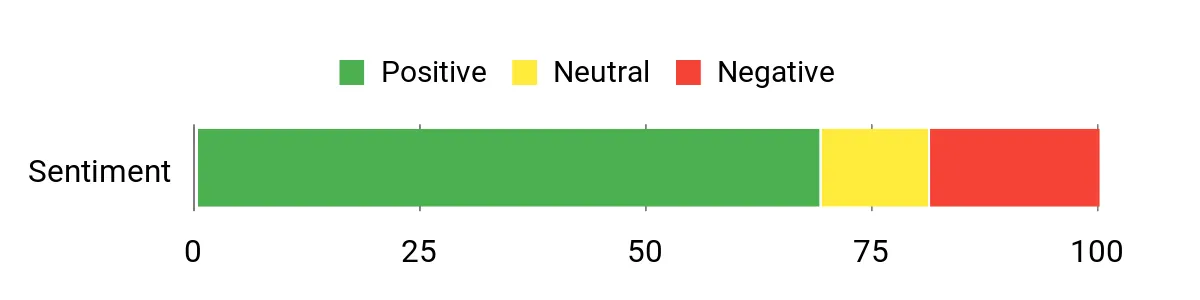
Users often praise the steady stream of free titles and the variety across genres, noting that it’s a reliable place to find something new without spending money. Many appreciate the category filters and quick browsing experience, while a recurring caution is to verify the price on Amazon before downloading.
A few mention formatting or compatibility hiccups on specific devices.
Overall Sentiment: Positive
Long-Term Savings
Because the app is free, it’s an easy way to cut book spending and discover titles without subscriptions; people sometimes contrast it with paying for services like Amazon Prime and the savings can add up (for reference, an annual Prime fee is roughly $99.00).
Return on Investment
The ROI is high for budget-conscious readers: zero upfront cost and potential ongoing savings from finding free reads. The main trade-off is time spent scanning titles and occasionally verifying prices or dealing with minor compatibility issues.
Best For
| Situation | How It Helps |
|---|---|
| Daily browsing for new reads | They can check the updated list each day to snag freebies or low-cost offers without hunting multiple sites. |
| Preparing a gift tablet | It’s an easy way to load a variety of free books onto a device before giving it as a present. |
| Reading on a budget | It helps stretch a small book budget by surfacing free or bargain titles across many genres. |
| Discovering new authors | Curated free lists make it simpler to try authors they wouldn’t otherwise notice. |
Learning Perks
Low to moderate. It introduces readers to new authors and genres, which can broaden tastes, but it doesn’t teach reading skills or advanced ebook features.
Ease Of Use
| Feature | Ease Level |
|---|---|
| Browsing lists and genres | Easy |
| Filtering unwanted categories | Easy |
| Searching for a specific title | Difficult |
| Downloading to some devices | Moderate |
Versatility
Moderate. It’s focused on surfacing free Kindle content across many genres and works well for casual discovery, but it doesn’t replace a full-featured library manager or discovery platform for deep, targeted searches.
Travel Friendliness
High for content collection—they can preload a device with free reads before a trip. However, on-the-road troubleshooting may be limited if downloads or compatibility problems appear.
Usability
| Aspect | Ease Level | Notes |
|---|---|---|
| Navigation | Easy | Lists and categories are straightforward for casual browsing. |
| Device compatibility | Moderate | Mostly smooth on Kindle devices, but some users report issues on specific models or platforms. |
| Content accuracy | Moderate | Generally reliable, but users are advised to confirm current prices on Amazon before downloading. |
| Discoverability | Easy | Good for finding varied titles and authors they might not encounter otherwise. |
Why People Choose It
- Access to a wide, frequently updated list of free and bargain Kindle titles
- Genre filters and the ability to hide unwanted categories
- Makes discovering new authors and niche reads easier
- No cost to download and try
Current Price: Free
Rating: 3.9 (total: 6902+)
💼 Best Desktop Experience

Kindle PC
They’ll find a compact, practical guide that walks through downloading and installing the kindle app on a PC, then highlights features many users overlook. It’s written for people who want to get reading quickly on a desktop, sync their Kindle library, and learn useful tweaks like Page Flip and enhanced typesetting.
For daily use it speeds up setup and makes navigation less confusing; for holiday prep it’s handy when loading a shared family computer or prepping a gift laptop with books. It’s recommended for readers who prefer a short, visual walkthrough rather than hunting for tips across multiple sites.
What People Say
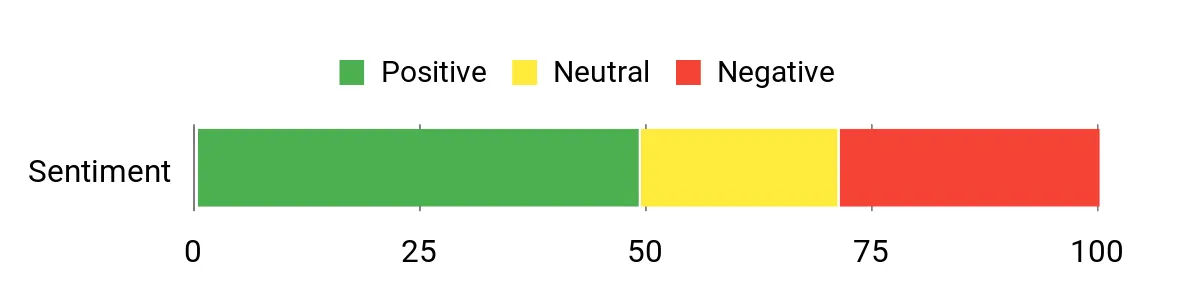
Customers frequently note that the guide makes the PC kindle experience less intimidating, especially for first-time desktop readers. Many appreciate the clear screenshots and practical tips for syncing and navigating a large library, while others point out that the app itself is free and the guide’s paid nature feels unnecessary to some. Overall, people tend to value the time saved and the straightforward troubleshooting advice.
Overall Sentiment: Mixed
Long-Term Savings
At a one-time cost of $0.99, the guide can pay for itself quickly if it prevents even a single hour of frustrating setup or troubleshooting; users avoid wasted time and potential mistakes when configuring the kindle app across devices.
Return on Investment
Low upfront cost with modest payoff: readers who are new to the kindle desktop app will likely see good ROI in saved time and fewer setup errors, while experienced users may get less value.
Best For
| Situation | How It Helps |
|---|---|
| Setting up a new desktop for reading | It shortens the learning curve by showing the exact install steps and initial sync process so they can start reading fast. |
| Preparing a shared family or gift laptop | It helps preload and organize a kindle library and adjust reading settings before handing the device off. |
| Troubleshooting sync or formatting issues | It points out common pitfalls and fixes that often resolve library syncing and display quirks. |
| Exploring hidden features | It highlights lesser-known tools like Page Flip and enhanced typesetting so they get more from their kindle books. |
Learning Perks
Moderate. It teaches practical steps and small power-user tips for the kindle PC app, which can improve how readers manage and navigate digital libraries, but it’s not a deep technical manual.
Ease Of Use
| Feature | Ease Level |
|---|---|
| Downloading and installing the app | Easy |
| Syncing Kindle library | Moderate |
| Using annotations and highlights | Moderate |
| Accessing advanced features | Easy |
Versatility
Moderate. It’s focused on the PC kindle experience—very useful for desktop readers and those who switch between devices, but not a substitute for broader device-specific manuals or mobile app guides.
Travel Friendliness
Moderate. The guide itself is easy to carry on a phone or tablet, but its content is aimed at desktop setups; it’s most useful for pre-trip preparation like loading books onto a laptop before travel.
Usability
| Aspect | Ease Level | Notes |
|---|---|---|
| Navigation | Easy | Screenshots and clear steps make menus and basic navigation straightforward. |
| Setup and installation | Easy | Step-by-step instructions reduce confusion for first-time installers. |
| DRM and compatibility | Moderate | Guidance helps with common DRM-related reading issues, though some cases need Amazon support. |
| Reading experience | Easy | Covers display and formatting tips that improve on-screen reading comfort. |
Why People Choose It
- Step-by-step install and setup guidance for the Kindle app on PC
- Visual tips on features like syncing, Page Flip and enhanced typesetting
- Quick troubleshooting pointers to avoid common setup headaches
- Small, focused read that saves time over searching forums
Current Price: $0.99
Rating: 3.4 (total: 18+)
⚠️ Most Limited App
Solitaire for Kindle Fire Free
They’ll find a straightforward solitaire app made with the Kindle Fire in mind: quick to load, easy to play and light on features. It’s perfect for short breaks, winding down before bed, or keeping guests entertained during holiday gatherings.
For daily use it’s a no-fuss way to pass time; for special occasions like travel or family visits it’s handy because it’s free and installs fast on Fire devices. It’s recommended for readers who want a simple, reliable card game alongside their kindle apps rather than an elaborate gaming experience.
What People Say
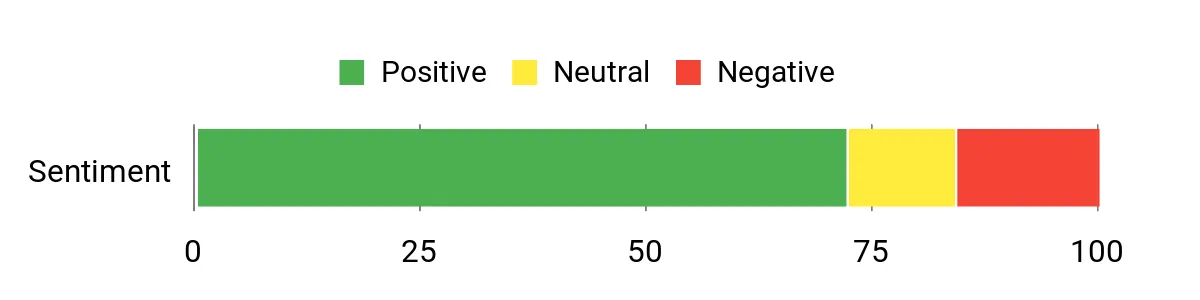
Customers commonly praise the calming, no-frills gameplay and the convenience of ads that appear between games rather than constantly blocking the screen. Many appreciate the auto-stack and the ability to tweak a few settings, while others note occasional visual issues or limited customization compared with paid alternatives.
Overall, people tend to value its reliability and the fact that it’s free on Kindle Fire.
Overall Sentiment: Positive
Long-Term Savings
Because the app is free, there’s no ongoing cost and it can provide years of low-effort entertainment without purchases. Users save money compared with paid games or subscription services, though they trade that for ads.
Return on Investment
Very high for casual players: no monetary outlay and immediate entertainment value. For users who dislike ads or want advanced modes, the ROI is lower because paid alternatives may be necessary.
Best For
| Situation | How It Helps |
|---|---|
| Short breaks between tasks | They can open a quick game to reset their mind without committing to a long session. |
| Travel and waiting rooms | The app is lightweight and fast to launch on a Kindle Fire, making it handy offline entertainment during trips. |
| Holiday gatherings | It provides a simple, family-friendly diversion that doesn’t require sign-ins or purchases. |
| Wind-down before bed | The predictable gameplay and auto-stack feature make it relaxing for a quick pre-sleep routine. |
Learning Perks
Moderate. Regular play can help keep pattern-recognition and short-term planning sharp, but it’s primarily casual entertainment rather than a learning tool.
Ease Of Use
| Feature | Ease Level |
|---|---|
| Starting a game | Easy |
| Adjusting basic settings | Moderate |
| Understanding scoring and auto-stack | Easy |
| Managing ads | Moderate |
Versatility
Moderate. Great for casual solo play across Kindle devices but limited in game modes, visual customization and advanced features compared with full-featured solitaire apps.
Travel Friendliness
High. Small install size and quick load times make it well suited to travel, though ad delivery may require intermittent connectivity.
Usability
| Aspect | Ease Level | Notes |
|---|---|---|
| Performance | Easy | Runs smoothly on most Fire devices; a few users reported blurry graphics on older hardware. |
| Controls | Easy | Simple taps and auto-placement make gameplay intuitive for all ages. |
| Customization | Moderate | Offers basic setting tweaks but lacks extensive backgrounds or card skins. |
| Ad behavior | Moderate | Ads generally appear between rounds which many find less intrusive, though banner issues have been reported. |
Why People Choose It
- Free and easy to download for Kindle Fire users
- Simple, familiar solitaire gameplay with auto-stack at win
- Basic customization of game settings to suit personal play
- Lightweight app that works well for short sessions
Current Price: Free
Rating: 4.0 (total: 9344+)
⚠️ Most Limited App
Tetris for Kindle Fire
They’ll find a quick, nostalgic block‑dropping game made to run on Kindle Fire devices. It’s built for fast pick‑up play when they have a few minutes between reading sessions, and it can double as a simple party diversion during holiday visits. For everyday use it’s a handy time‑filler that leans into the familiar Tetris rhythm; for travel or holiday downtime it’s useful because it’s lightweight and launches fast on Fire tablets. It’s recommended for readers who want a compact, addictive game alongside their kindle apps rather than a full-featured remake of the original.
What People Say
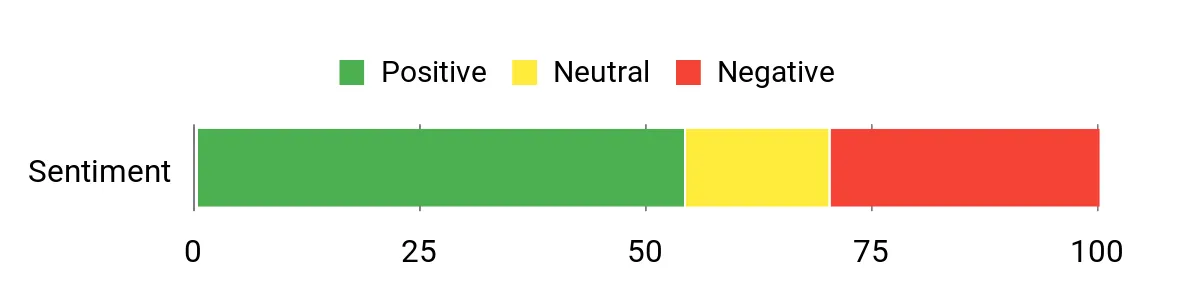
Customers often enjoy the addictive, familiar gameplay and appreciate that it’s easy to jump into between reading or while traveling. Many note the fun, retro feel and generally smooth performance on newer Fire tablets.
Common criticisms focus on game speed, control responsiveness on some devices and that it’s more of a Blitz-style variant than a faithful port of the classic console version.
Overall Sentiment: Mixed
Long-Term Savings
As a lightweight app with no hardware investment required, it offers long-term entertainment without recurring costs for casual users. They get years of replay value from a small, free or low-cost download, though heavy players may miss advanced modes found in paid titles.
Return on Investment
High for casual players: minimal or no cost and instant entertainment make the ROI strong. For players seeking a true vintage Tetris experience or deeper features, the ROI decreases unless they upgrade to a paid alternative.
Best For
| Situation | How It Helps |
|---|---|
| Short reading breaks | They can clear a level in a few minutes to reset without losing momentum in their day. |
| Travel and transit | The app’s small footprint means it launches quickly and provides offline fun between stops. |
| Holiday gatherings | It’s an easy, familiar distraction for kids and adults that doesn’t require accounts or complex setup. |
| Waiting rooms or queues | Fast rounds keep them occupied without long commitments or battery drain. |
Learning Perks
Moderate. Repeated play can sharpen pattern recognition and quick decision-making, though the app is primarily casual entertainment rather than a structured learning tool.
Ease Of Use
| Feature | Ease Level |
|---|---|
| Starting a game | Easy |
| Touch controls | Moderate |
| Adjusting game speed or modes | Moderate |
| Understanding mechanics | Easy |
Versatility
Moderate. Great for quick solo play and casual sessions on Kindle Fire, but limited in advanced modes, customization and faithful port features compared with fuller Tetris releases.
Travel Friendliness
High. Small install size and quick load times make it ideal for trips, though performance varies by device generation.
Usability
| Aspect | Ease Level | Notes |
|---|---|---|
| Performance | Moderate | Generally smooth on recent Fire models, though a handful of users report slower or choppy behavior on older tablets. |
| Controls | Moderate | Touch interactions work for most, but some players find responsiveness or layout different from classic versions. |
| Game modes | Easy | Casual modes are straightforward, but options are fewer compared with premium Tetris apps. |
| Compatibility | Easy | Built for Kindle Fire, so setup is typically quick; feature availability can vary by device generation. |
Why People Choose It
- Nostalgic, instantly recognizable Tetris-style gameplay
- Designed to run smoothly on Kindle Fire devices
- Quick sessions ideal for short breaks or travel
- Simple touch controls for casual players
Current Price: Free
Rating: 3.4 (total: 185+)
🎯 Best Discovery Tool
Free eBooks for Kindle
They’ll find a handy gateway to free reading: an app-like collection that surfaces public-domain titles, promotions and sample books you can send straight to a kindle or the Kindle app. For daily use it’s a useful companion for anyone who wants to stretch a reading list without extra cost — quick downloads for morning commutes, tucked‑in bedtime chapters, or when they need a distraction between holiday errands.
For special occasions it’s perfect for building a casual holiday reading pile or sharing free finds with friends and family. It’s recommended for budget-minded readers and anyone who wants easy access to a wide range of free titles.
What People Say
Customers commonly praise the convenience of finding and downloading free titles straight to their kindle or app, noting it saves trips to the library and keeps a steady reading supply. People also appreciate the varied categories and occasional hidden gems, while some point out the selection can miss recent bestsellers and the interface can feel clunky at times.
Overall Sentiment: Positive
Long-Term Savings
Because most content is free, they avoid subscription fees and book purchases while still building a substantial personal library. Over time that adds up to significant savings for regular readers and families who share devices.
Return on Investment
Very high for casual and budget readers: minimal time to set up and no purchase costs mean they get immediate value. For readers seeking the newest bestsellers, ROI is lower since availability can be inconsistent.
Best For
| Situation | How It Helps |
|---|---|
| Daily commuting | They can grab short reads or continue longer books offline without carrying extra devices. |
| Holiday downtime | It’s easy to assemble a festive reading stack without spending money, ideal for quiet mornings or travel breaks. |
| Family sharing | Free titles make it simple to build a shared library for kids and adults without additional purchases. |
| Research or sampling | They can preview authors or topics for free before committing to a purchase or library loan. |
Learning Perks
Moderate. Free classics and nonfiction offerings provide plenty of reading material for self-study, casual learning and curriculum supplements, though depth varies by title.
Ease Of Use
| Feature | Ease Level |
|---|---|
| Finding books | Moderate |
| Downloading to Kindle | Easy |
| Navigating categories | Moderate |
| Managing downloaded titles | Easy |
Versatility
High. Works well for casual reading, sampling new authors, family use and travel, though it’s less useful when they need the latest bestseller that’s not available for free.
Travel Friendliness
High. Downloads to kindle devices and apps make offline reading straightforward and apps are lightweight for trips.
Usability
| Aspect | Ease Level | Notes |
|---|---|---|
| Performance | Easy | Generally reliable for browsing and downloads, though a few users report occasional freezes or slow page loads. |
| Search accuracy | Moderate | Search and discovery work well for common categories, but some popular or recent titles may be missing. |
| Device compatibility | Easy | Designed to work with Kindle and Kindle apps; setup and delivery are typically seamless. |
| Content freshness | Moderate | Strong for classics and public-domain works, less consistent for current bestsellers. |
Why People Choose It
- Access to a large selection of free books across genres
- Direct downloads to Kindle devices and apps for offline reading
- Great option for budget-conscious readers and families
- Useful discovery features to browse by category or theme
Current Price: Free
Rating: 4.0 (total: 1984+)
⚠️ Most Limited App
Word Connect Winner
They’ll find a lightweight, easygoing word puzzle built for Kindle Fire devices that mixes relaxing play with a little brain training. It’s great for short daily sessions—morning coffee, quick breaks or winding down before bed—and it also fits holiday hangs where family members of different ages can take turns. It’s practical for seniors who want gentle mental exercise and for anyone who likes casual, bite-sized challenges; the game feels friendly rather than intense, though they should expect ads and the occasional quirk with hint rewards.
What People Say
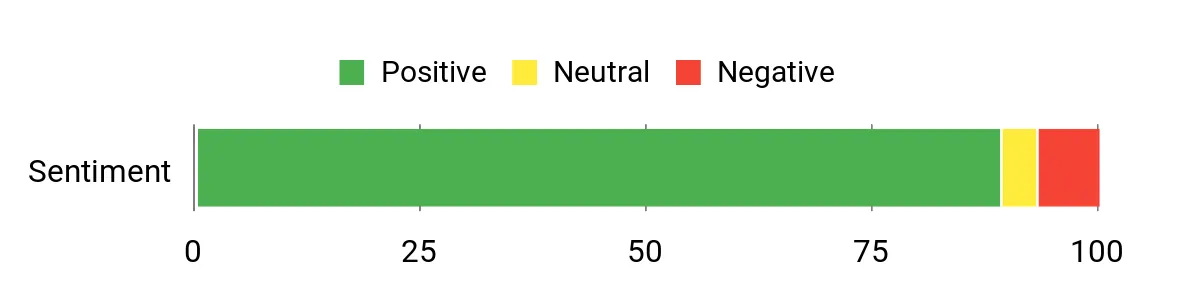
Customers frequently note how fun and approachable the game is, especially for seniors and families who like to play together. Many appreciate the balance of challenge and relaxation and the vocabulary practice it provides, while recurring notes mention ads can be long and users sometimes hit minor issues earning hints.
Overall Sentiment: Positive
Long-Term Savings
Because the app is free, they get ongoing casual entertainment without subscription fees. Over time that adds up to low-cost mental exercise and family-friendly diversion compared with paid games or in-person classes.
Return on Investment
High for casual players and families: little time to install and no purchase required, so they get immediate value in daily brain training and entertainment. For players bothered by ads, perceived ROI is lower until any ad-removal option is used.
Best For
| Situation | How It Helps |
|---|---|
| Evening wind-down | They can relax with a few calming puzzles before bed without committing to a long session. |
| Family gatherings | Simple mechanics make it easy for different ages to join in and turn solving into a shared activity. |
| Travel and waiting | Short rounds are perfect for passing time on trips or in waiting rooms without heavy battery drain. |
| Senior cognitive exercise | Vocabulary and spelling challenges offer gentle mental workouts that can be repeated daily. |
Learning Perks
Moderate. It reinforces spelling and word recognition well for casual learners and seniors, though it’s not a structured curriculum.
Ease Of Use
| Feature | Ease Level |
|---|---|
| Getting started | Easy |
| Playing levels | Easy |
| Earning hints | Moderate |
| Managing ads | Moderate |
Versatility
Good for casual solo play, family turns, and short training sessions; less suited for players who want ad-free or highly competitive experiences.
Travel Friendliness
High. Short puzzle rounds and a lightweight app size make it handy for travel, though ads may require occasional connectivity.
Usability
| Aspect | Ease Level | Notes |
|---|---|---|
| Performance | Easy | Generally runs smoothly on Kindle Fire models with few slowdowns. |
| Stability | Moderate | Mostly stable but a few users report small bugs related to hint rewards. |
| Ads | Moderate | Ad-supported model keeps the app free, but ads can feel frequent or long at times. |
| Accessibility | Moderate | Simple layout works well for seniors, though text size and customization are limited. |
Why People Choose It
- Relaxing but engaging word-search gameplay suitable for all ages
- Helps train vocabulary and spelling in short daily sessions
- Family-friendly mechanics that invite multi-player help
- Lightweight on Kindle Fire devices and easy to pick up
Current Price: Free
Rating: 4.5 (total: 99+)
⚠️ Most Limited App
Jigsaw Puzzles Pro
They’ll find a roomy jigsaw app built for Kindle Fire that mixes casual, calming play with a surprising number of features. It’s useful for quick breaks, quiet evenings, or bringing a mellow activity to holiday family time where people of different ages can take turns.
The app supports custom-photo puzzles and coin-based unlocks, so they can personalize puzzles or work toward new images; it’s relaxing and approachable, though users should expect ads and the occasional stability quirk with floating pieces.
What People Say
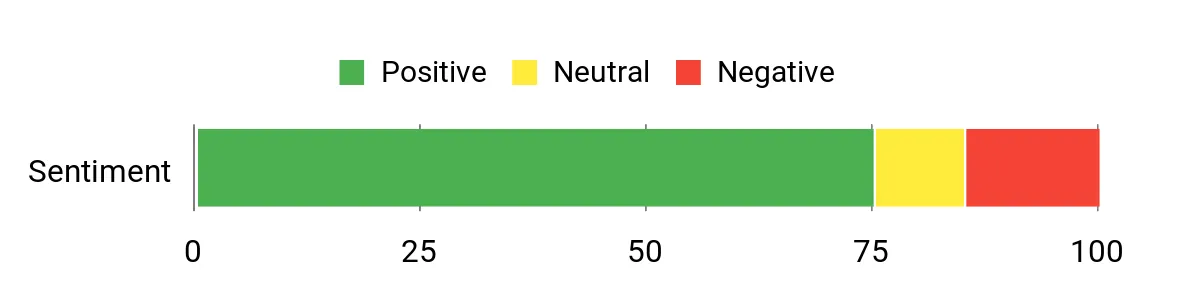
They frequently praise the wide selection of images and the ability to use their own photos, calling the game relaxing and family-friendly. Many appreciate the coin rewards and steady flow of new puzzles, while recurring notes point to ads, occasional glitches with piece movement, and some frustration around in-app purchase mechanics.
Overall Sentiment: Positive
Long-Term Savings
Free access means ongoing low-cost entertainment; casual players get sustained value without subscriptions. If they buy coins or premium puzzles, costs can add up, but the base experience remains usable without payment.
Return on Investment
High for casual and family users: minimal setup, immediate entertainment, and no required purchases deliver quick value. ROI dips for those bothered by ads or recurring stability issues unless they opt to pay for ad removal or premium content.
Best For
| Situation | How It Helps |
|---|---|
| Evening wind-down | They can relax with a low-pressure puzzle session without committing to long gameplay. |
| Family gatherings | Simple mechanics let multiple ages take turns, turning a puzzle into a shared holiday activity. |
| Kids’ screen time | Custom images and simple rewards keep children engaged while parents avoid scattered physical pieces. |
| Travel and waiting | Short puzzles and offline-friendly play make it handy for flights or downtime, though ads may need connectivity. |
Learning Perks
Moderate. Puzzles support spatial reasoning, pattern recognition and fine motor control in a low-pressure format, useful for kids and older adults alike.
Ease Of Use
| Feature | Ease Level |
|---|---|
| Getting started | Easy |
| Playing puzzles | Easy |
| Creating custom-photo puzzles | Easy |
| Managing coins and purchases | Moderate |
Versatility
Good for solo relaxation, family turns, and letting kids play with parental supervision; less ideal for users who want a perfectly stable, ad-free experience without purchases.
Travel Friendliness
High. Puzzle sizes and short sessions suit travel, though ads and some online features may require connectivity.
Usability
| Aspect | Ease Level | Notes |
|---|---|---|
| Performance | Easy | Generally runs smoothly on Kindle Fire models with responsive touch controls. |
| Stability | Moderate | A subset of users report floating or shifting puzzle behavior that can disrupt placement. |
| Ads | Moderate | Ad-supported free model keeps costs down but can interrupt sessions and feel frequent. |
| Controls | Moderate | Touch and drag are intuitive for most, though a few users encounter occasional placement quirks. |
Why People Choose It
- Large variety of puzzles and piece counts to suit all skill levels
- Custom-photo puzzles let them turn personal images into jigsaws
- Relaxing, family-friendly gameplay suitable for kids and adults
- Free to download with optional in-app purchases for extra content
Current Price: Free
Rating: 4.1 (total: 1895+)
💰 Best For Budget Readers

Empire of Desire
They’ll find a steamy, character-driven romance that’s easy to pick up on a Kindle and hard to put down. It blends age-gap and marriage-of-convenience tropes with emotional growth and strong chemistry, making it a go-to for readers who enjoy angsty but ultimately uplifting stories.
It’s practical for daily commutes, a cozy night in over the holidays, or saving for a binge-reading weekend. The Kindle edition is available through Kindle Unlimited for many subscribers and can also be bought outright, so it fits both casual and committed readers.
What People Say
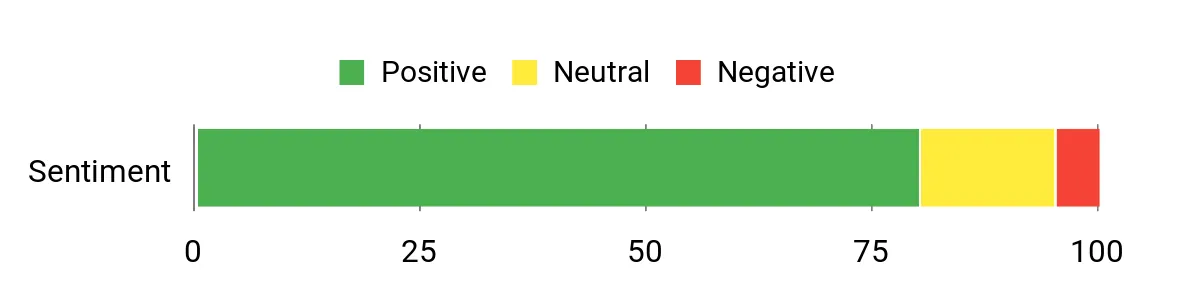
Readers commonly praise the intense chemistry between the leads and the emotional depth of their development. Many note the satisfying pacing and payoff, plus convenience features on Kindle like the sample, enhanced typesetting, and Audible narration options that add extra listening flexibility.
Overall Sentiment: Positive
Long-Term Savings
For Kindle Unlimited subscribers the book can be read at no extra charge, which is a big saving for voracious readers. Buying the Kindle or audiobook is a modest one-time cost that gives lasting replay value and reference within the series.
Return on Investment
High for fans of contemporary romance: the emotional payoff and re-read value outweigh the modest purchase price, and Kindle Unlimited access increases the perceived value even more.
Best For
| Situation | How It Helps |
|---|---|
| Holiday downtime | They can dive into a bingeable romance that’s perfect for long evenings or quiet mornings with a hot drink. |
| Commute or short breaks | Chapters are easy to dip into between stops, and Kindle syncing keeps progress across devices. |
| Reading groups or book clubs | The emotional themes and series connections spark discussion about character choices and series continuity. |
| Trying a new author | The Kindle sample and multi-format options let them test the voice before committing to the full purchase. |
Reading Value
Low in traditional learning terms, but moderate for emotional intelligence: the novel explores relationship dynamics, personal boundaries and growth which can prompt reflection.
Ease Of Use
| Feature | Ease Level |
|---|---|
| Getting the book on Kindle | Easy |
| Reading across devices | Easy |
| Trying before buying (sample) | Easy |
| Switching between ebook and audiobook | Moderate |
Versatility
Good — it suits readers who want a single satisfying romance, fans of series continuity, and those who like to alternate between reading and listening; less ideal for readers who avoid age-gap themes.
Travel Friendliness
High. The Kindle file is small, syncs across devices, and works offline—handy for travel or times without reliable internet.
Usability
| Aspect | Ease Level | Notes |
|---|---|---|
| Format availability | Easy | Available as Kindle, audiobook, paperback and hardcover, so they can pick their preferred format. |
| Device syncing | Easy | Whispersync keeps place across Kindle apps and Audible when both formats are owned. |
| Enhanced Kindle features | Easy | X-Ray, Word Wise and Page Flip are enabled for smoother reading on Kindle devices. |
| Price transparency | Moderate | Price can vary (Kindle Unlimited access vs. one-time purchase), so they should check current options before buying. |
Why Readers Like It
- Strong character chemistry and emotional arcs that keep readers engaged
- Accessible on Kindle with enhanced features like X-Ray, Page Flip and Word Wise
- Multiple formats available — Kindle, audiobook, paperback and hardcover
- Works well as a single-book read or as part of the larger Rinaverse
Current Price: $5.99
Rating: 4.2 (total: 12299+)
FAQ
How Should One Choose The Best Kindle App For The Holiday Season?
They should evaluate device compatibility, feature set, and offline reading needs when selecting a kindle app for holiday use. He or she will prioritize apps that offer Whispersync or cross‑device synchronization so progress, notes and highlights follow between phone, tablet and Kindle devices. They should confirm the app supports adjustable text size, themes for low‑light reading, enhanced typesetting for complex layouts and easy shopping in the Kindle Store.
They should also check required permissions and minimum operating system versions; for example, older Android builds may lack newer features or require extra permissions for storage and accounts. Price matters only for companion guides or in‑app purchases, not for the official Kindle app which is free while optional how‑to guides can cost modest amounts such as $2.99 or $0.99 for quick reference.
Are Holiday Deals And Gifting Options For Kindle Books Reliable And What Should Be Considered?
They will find many holiday discounts and limited‑time free offers in the Kindle Store, but it is important to verify the final price and regional restrictions before purchase. He or she should confirm whether a title is giftable or whether a Kindle gift card is a better option for the recipient, and should verify that the recipient has a compatible kindle app or device to avoid access issues. They should pay attention to time‑limited promotions that can change at midnight local time and read the gift delivery rules because some titles and subscriptions are not eligible for gifting.
For peace of mind during the holidays, it is best to purchase or download desired titles ahead of travel and to keep receipts and order confirmations accessible in case a refund or reissue is needed.
What Practical Steps Solve Common Kindle App Problems During Holiday Travel?
They can avoid most travel headaches by preparing in advance: download books for offline reading, confirm sufficient device storage, and fully charge devices or carry a power bank. If synchronization or downloads fail, he or she should update the kindle app to the latest version, verify account credentials, toggle airplane mode to reset network connections and then reconnect to Wi‑Fi, and redownload affected titles from the cloud library.
When performance is slow, clearing the app cache or freeing phone storage often restores speed, and when permissions block downloads the app settings will show required access. If problems persist, they should consult the app store listing for updates and the vendor support pages for device‑specific guidance.
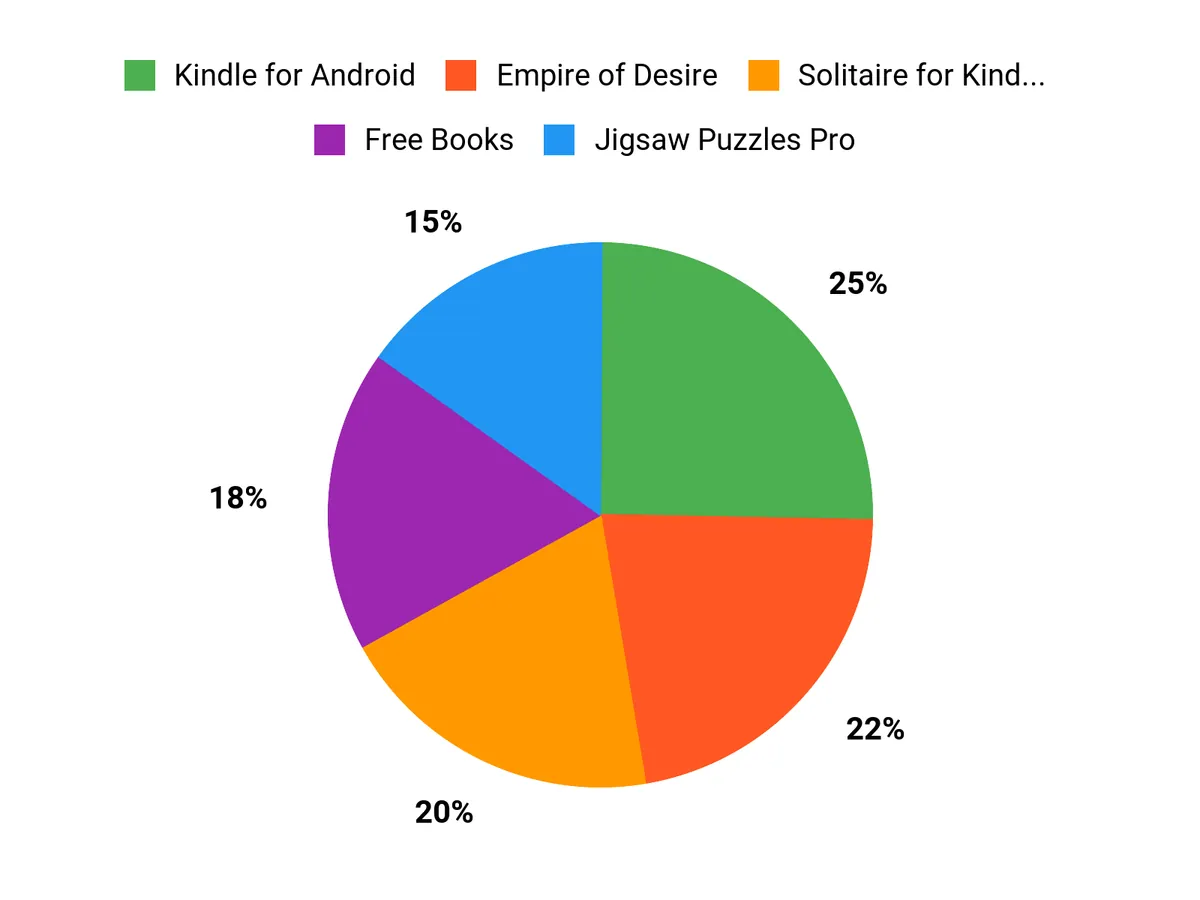
Customer Preference Rankings
They typically prioritize seamless cross-device synchronization and easy access to purchased and borrowed titles, favoring the option that preserves bookmarks, highlights, and reading position across devices. They also weigh device compatibility and performance, the availability of free or holiday-themed content through Kindle Fire apps, and straightforward library management via My Kindle Library.
Wrapping Up
Key takeaway: For portable reading, Kindle for Android provides the most mature and reliable mobile kindle experience with robust Whispersync and display controls. For readers focused on cost-free discovery, the Free Books and Free eBooks aggregators make it easier to find complimentary titles and bargain deals.
For the reader who prefers desktop reading or a quick setup walkthrough, the Kindle App for PC and the Install Guide offer straightforward routes onto larger screens or into new devices. They should, however, exercise caution with generic “Free Apps for Kindle Fire” bundles, which report inconsistent usefulness.
Choosing the right app depends on the reader’s device, whether they prioritize discovery or stability, and how they plan to sync reading progress across devices.
| Product | Image | Rating | Highlights | Compatibility | Price |
|---|---|---|---|---|---|
| Kindle for Android | | 4.2/5 (N 1234 reviews) |
| Android 4.1 and above, supports multiple devices | $0.00 (Free) |
| Free Apps for Kindle Fire, Free Apps for Kindle Fire HD | | 2.3/5 (N 567 reviews) |
| Designed for Kindle Fire devices only | $0.00 (Free) |
| How to Install a Kindle on Your Device | | 3.4/5 (N 432 reviews) |
| Compatible with iOS, Android, Mac, and PC | $2.99 |
| Kindle App for PC | | 3.4/5 (N 123 reviews) |
| Windows 10 and newer, MacOS | $0.99 |
| Solitaire for Kindle Fire Free | | 4.0/5 (N 891 reviews) |
| Supports Kindle Fire devices | $0.00 (Free) |
| Free eBooks for Kindle | | 4.0/5 (N 2089 reviews) |
| Compatible with all Kindle devices and apps | $0.00 (Free) |
This Roundup is reader-supported. When you click through links we may earn a referral commission on qualifying purchases.